iPhone · iPad · Mac

Every document becomes clean Markdown — without leaving your device.

PDF, Word, Excel, PowerPoint and ten more formats, converted on your own hardware. Tables, footnotes and math survive the trip. Nothing is uploaded — there is no server to upload to.

Coming to the App Store. Pick a platform and we will write once, on launch day.

PDF DOC DOCX RTF ODT EPUB XLS XLSX XLSB ODS CSV PPT PPTX ODP
$29.99 once — iPhone + iPad + Mac or $2.99/month, 3-day free trial
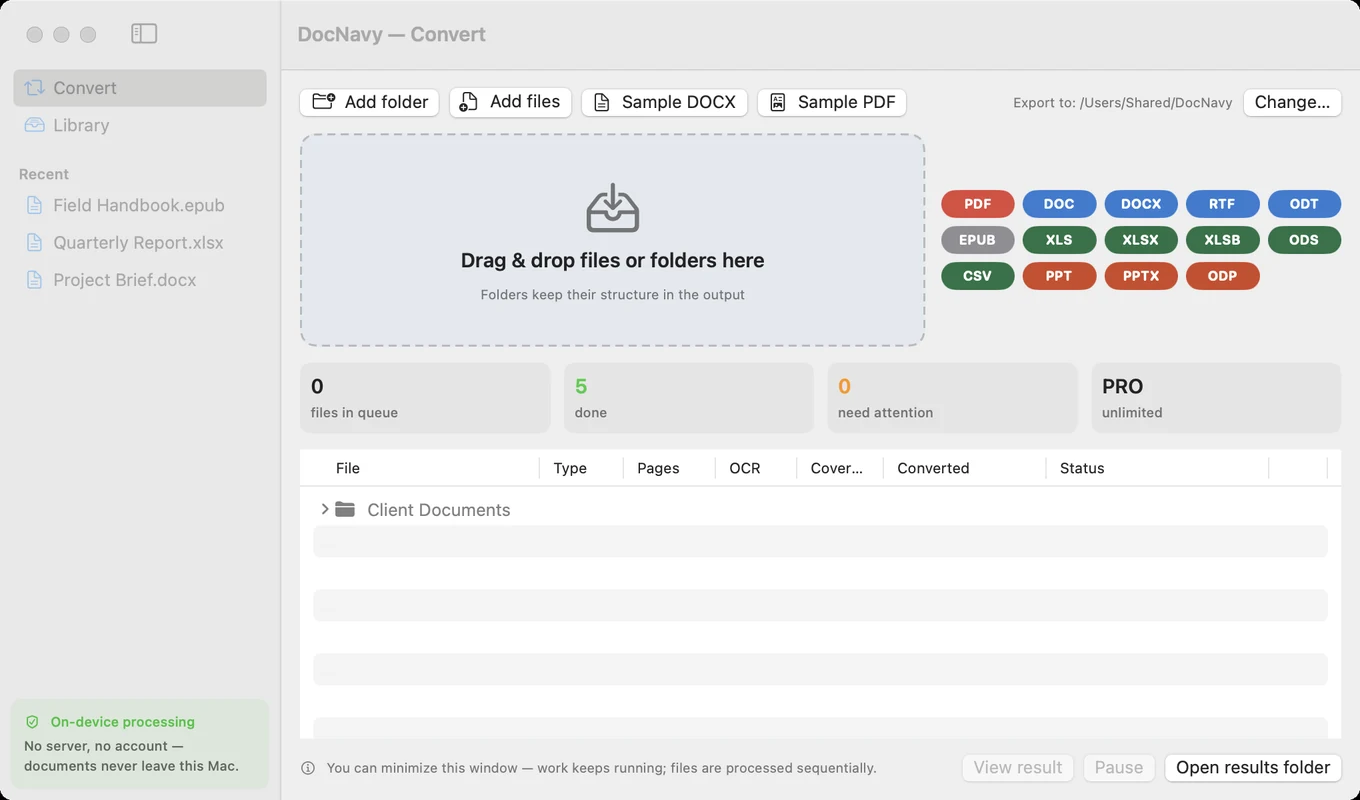
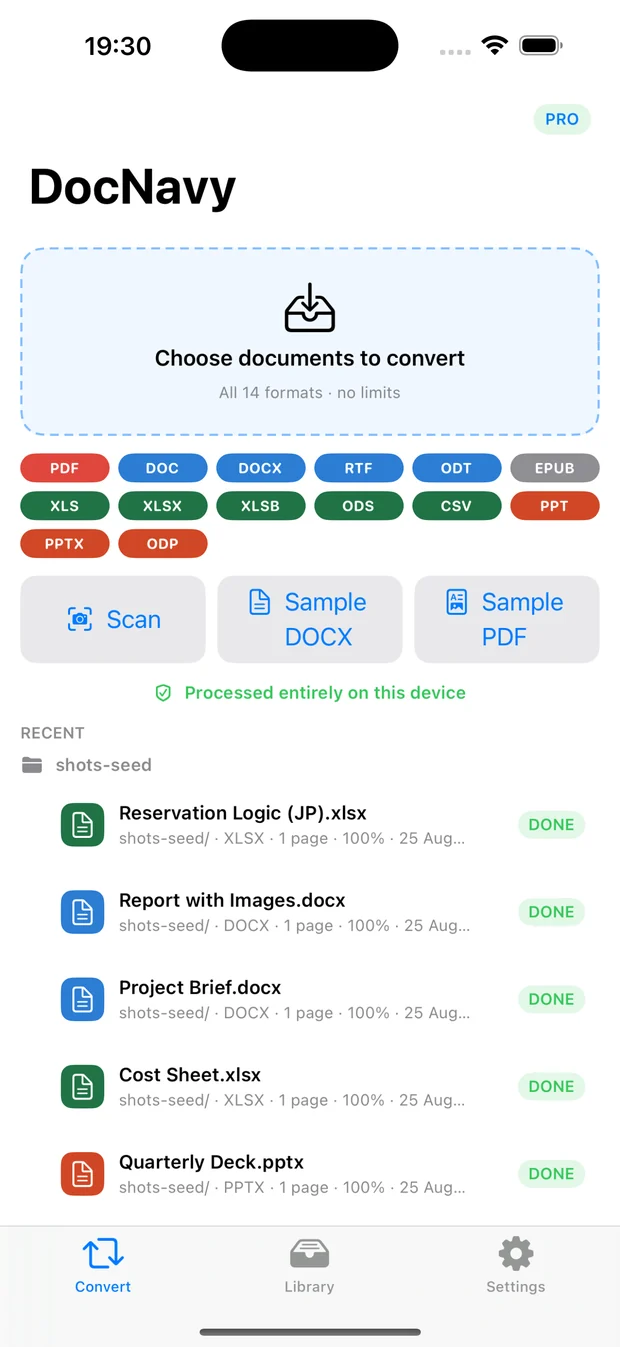
DocNavy Convert window on Mac: drop zone, all 14 format chips and live counters DocNavy on iPhone with the same drop zone and format list
14formats in, Markdown out
0bytes ever uploaded
100%on-device, offline OCR
5 files/dayfree forever, no watermark
What comes out

Markdown a vault can actually use

Headings stay headings. Lists keep their nesting. Tables keep their columns. Footnotes keep their anchors. This is a real conversion, not text scraped off a page.

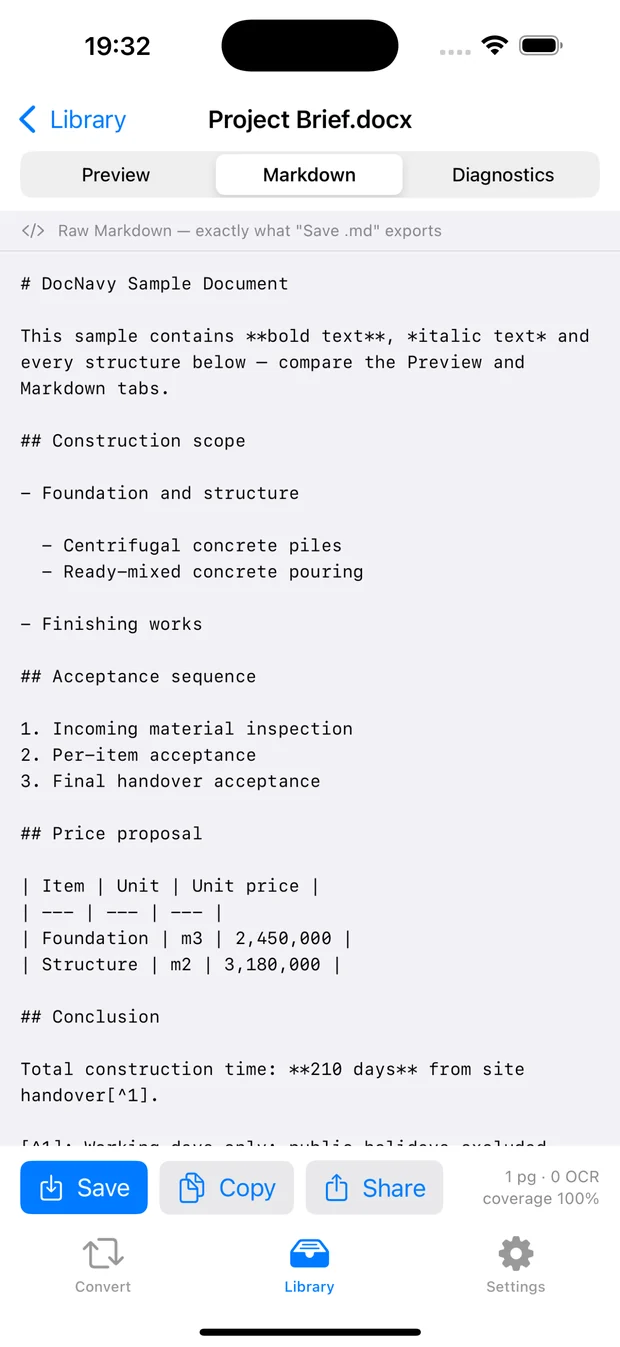
Markdown tab showing raw output on iPhone
See the raw Markdown. Exactly the bytes that get saved — copy a block or the whole file.
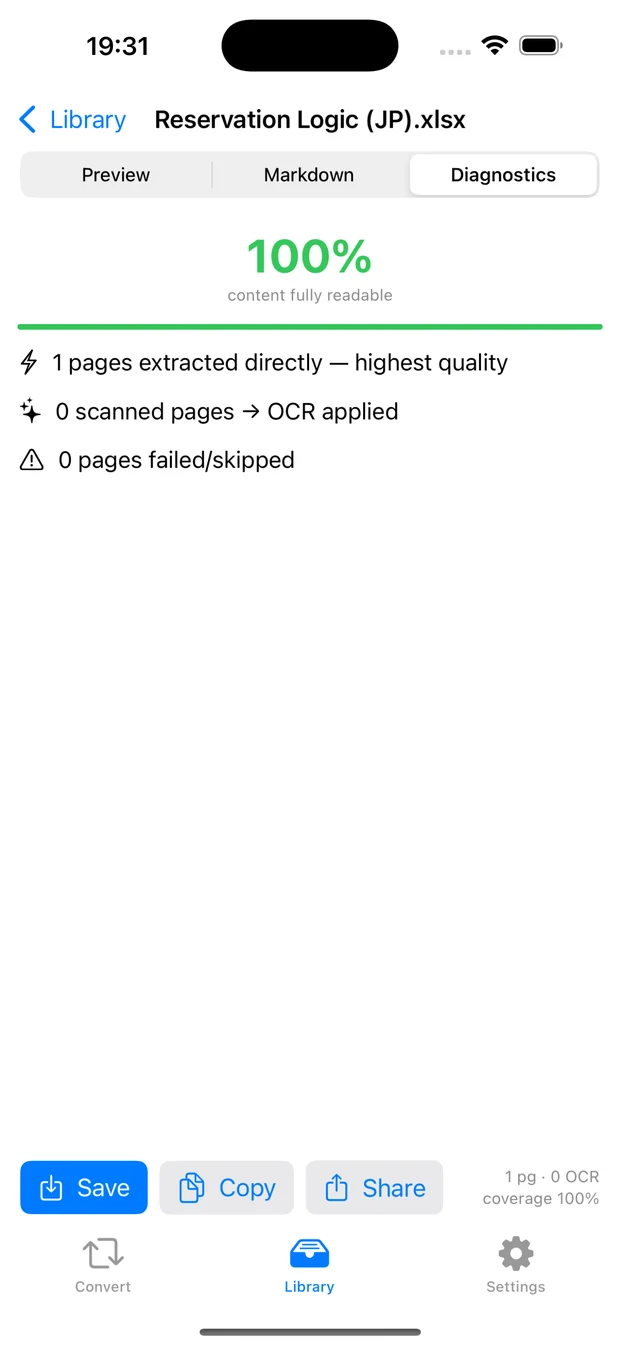
Diagnostics tab showing 100 percent coverage and per-page detail
Know what it missed. Per page: extracted directly, recovered by OCR, or failed — and why.
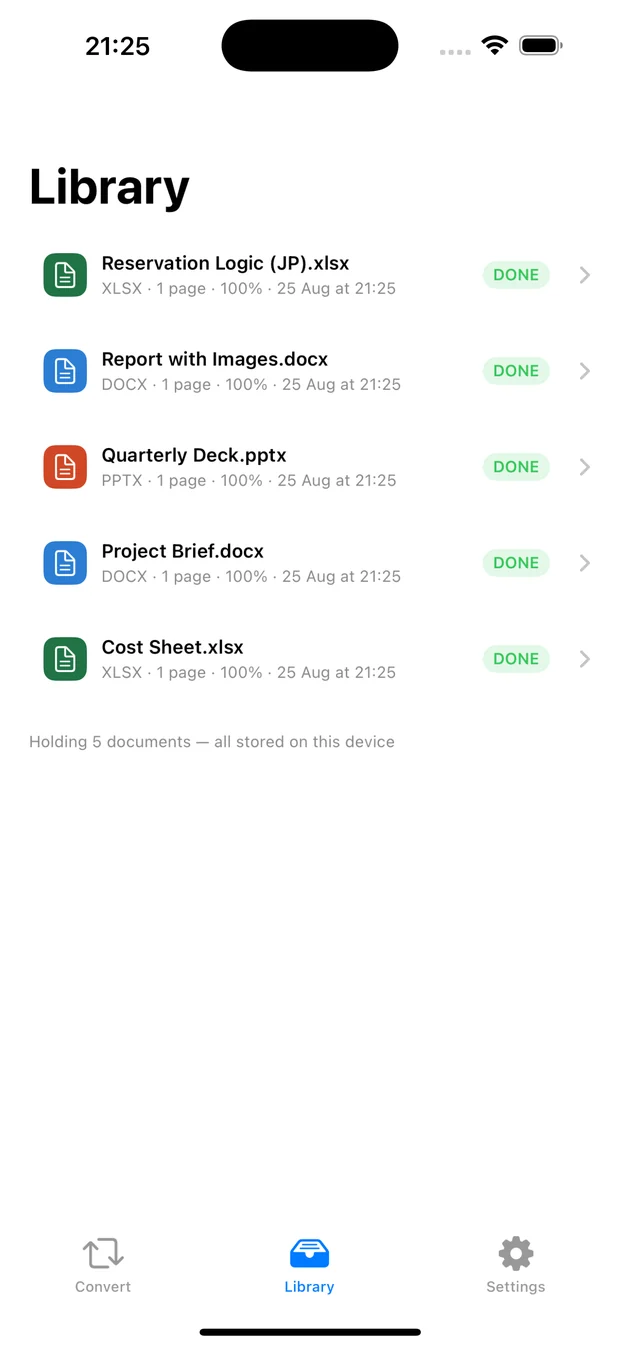
Library of converted documents on iPhone
Everything stays yours. Converted files live in a folder you picked, on your device.
Why it is different

Three things most converters get wrong

Your files stay put

No account, no server, no network call. The conversion happens inside the app on your device — the only arrangement that works when your documents are contracts, case files or patient records.

Tables and math survive

Merged cells keep their shape, footnotes keep their anchors, formulas come out as LaTeX — so a report still reads like a report after conversion, not like debris.

It tells you what it missed

Every file gets a per-page report. You never have to read the whole output just to find out whether a page went quietly missing.

14 formats in — one format out

Scanned pages are recognised on-device with Apple Vision, and only the pages that actually need it: a 200-page file with three scans costs three pages of battery, not two hundred.

PDF DOC DOCX RTF ODT EPUB XLS XLSX XLSB ODS CSV PPT PPTX ODP
Who it is for

Built for three kinds of desk

DocNavy is for the documents where the file is long, the table matters, or the content cannot leave the building.

You are building a knowledge vault

Books, papers and reports have to land in Obsidian or Logseq as real Markdown — headings intact, folder structure mirrored, images next to the note. Not a wall of text you have to re-format by hand.

You feed documents to AI every day

Chatbots read Markdown far better than a pasted PDF. The difference shows up in tables: a price list that survives conversion is a price list the model can actually reason about.

Your profession forbids uploading

Law, accounting, healthcare, finance. “Do not send client files to a third party” is not a preference, it is the rule you work under. DocNavy has no server to send them to — and macOS blocks it from opening a connection at all.

Worked examples

The documents that usually break converters

Cases from our own regression suite — 14 formats × 4 difficulty levels, run on iPhone and Mac before every release.

200-page report · 3 scanned pages

Only the scanned pages cost you battery

The engine classifies every page first, so OCR runs on the three that need it — not on all two hundred. In the suite the recovered pages come back with their headings intact (# and ##), not as flat text.

Spreadsheet · 6,000 rows

Long tables arrive whole

A 6,000-row sheet converts with every row present — the assertion fails the build if a single one goes missing. Merged cells keep their span, and text boxes anchored mid-table land between the right rows, not dumped at the end.

PDF with embedded CJK fonts

Japanese and Chinese come out readable

The classic failure here is silent: the text extracts as garbage and nobody notices until much later. DocNavy ships the character maps inside the app and the suite checks a CJK-embedded PDF on every build.

Deck with a SmartArt diagram

Diagrams keep their hierarchy

A SmartArt tree is compared against a stored reference — parent-child relationships and drawing order both have to match. Formulas are checked the same way, as block $$…$$ and inline $…$.

Verify, don’t trust

“We don’t collect data” is a claim.
Here is how you check it.

Two minutes with a tool Apple ships in every iPhone.

STEP 1

Open Settings › Privacy & Security › App Privacy Report and turn it on.

STEP 2

Use DocNavy normally for a few days — convert whatever you like.

STEP 3

Open DocNavy’s entry. The list of domains contacted should be empty.

On the Mac the app ships without the network entitlement at all — macOS will not let it open a connection even if it wanted to. That is enforced by the operating system, not by our good intentions.

Pricing

The free tier is the whole app

Not a crippled demo. Every feature is unlocked from the first launch — paying only lifts two limits.

Free
$0
Forever. No account, no watermark, no expiry.
  • All 14 formats, unlimited OCR
  • Whole folders, zip export
  • Per-page diagnostic report
  • 5 documents per day
  • First 50 pages of each file
Start free
A long file is never refused — you still get 50 real pages.
Monthly
$2.99/month
Both limits gone while you need them. Cancel any time.
  • Unlimited documents and pages
  • 3-day free trial
  • Cancel in one tap from your Apple ID settings
  • Stops when the subscription stops
Start the trial
Renews automatically each month until you cancel.
Best value
Pro · pay once
$29.99 once
Both limits gone — permanently.
  • Yours forever — no renewal, no expiry
  • Unlimited documents and pages
  • Cheaper than the subscription from month ten onward
Buy once, $29.99
Prices in USD; the App Store charges in your local currency.

Identical in every tier: no upload, no account, no watermark, no telemetry, full output quality. Paying changes how much you can convert — never how well.

FAQ

Questions people actually ask

Do I need an account?

No. There is no sign-up, no login and no password to lose. Your purchase rides on your Apple ID, which is also how it reaches your other devices.

What happens to a 300-page book on the free tier?

It converts the first 50 pages at full quality and tells you how many remain. If you buy Pro afterwards it continues from page 51 — pages already recognised by OCR are not processed again.

Monthly or one-time — which should I pick?

Monthly if you have a burst of work and want out afterwards. One-time if you expect to keep using it: at $2.99/month the subscription passes $29.99 in the tenth month, and after that the one-time purchase is simply cheaper.

Where do converted files go?

Into a folder you choose on your own device. Nothing is copied anywhere else, and deleting the app deletes its working files with it.

Does it work offline?

Always. Offline is the only mode there is — including OCR, which uses the recognition engine built into iOS and macOS.

Is this good for Obsidian?

That is exactly who it was built for. Folder structure is mirrored in the output, images are extracted next to the Markdown, and headings, tables and links land in a shape a vault can use.

Which devices are supported?

iPhone and iPad on iOS/iPadOS 17 or later, and Mac on macOS 14 or later.

Already using DocNavy and something went wrong? The support page covers troubleshooting — garbled pages, OCR languages, restoring a purchase.

Documents in. Markdown out.
Nothing else leaves.

Coming to the App Store for iPhone, iPad and Mac.

Requires iOS/iPadOS 17 or macOS 14.